Posts

Showing posts with the label moss 2007

How to open a PDF file (or any file) in the sharepoint site

Image
Not long ago, I had to view a PDF file from sharepoint . But I got the following message: Do you want to save file-name from yours-site Who does not know this message? But I've  target ' self ' in 'a' tag html???? It turns out that SharePoint having your code to protect customers. They can only give you their familiar software like Office, but a pdf file - Microsoft unfamiliar terms. To resolve, you need to make a change in Central-Admin Go to your Web Application manage - General Setting Find Browser File Handling and Change the default to Strict . It all friends, now you can view any file on the portal (at your own risk). Your, Roi

Speedup Powershell at SharePoint 2013

Image
If you worked in stsadm in MOSS 2007 and even if it worked in SharePoint 2010 , you saw it slow. In 2010 we also added the powershell - who was sometimes slow. It turns out that in sharepoint 2013 not made significant changes - is suggested The solutions are Add crl.microsoft.com to your hosts file and point it to your local machine Go to Start -> Run Click "Drivers" (It need to open " C:\Windows\System32\drivers " - in not go to it) Go to folder " etc " and open " hosts " file with notepad and add this line 127.0.0.1       crl.microsoft.com Disclosure: this solution find a lot on Google - but my no significant change Disable the CRL check by modifying the registry for all user accounts that use STSADM and all service accounts used by SharePoint. Go to Start -> regedit and fund this location [HKEY_USERS\<userid>\Software\Microsoft\Windows\CurrentVersion\WinTrust\Trust Providers\Software Publishing] Yon need to change all y...

Value does not fall within the expected range

Image
Time introduced some strange problem. I needed to build a list with a lookup field. So build fields.. Then create content type.. and than a list detention.... Just.. Piece of cake. As you know, Lookup field problem must be linked to an existing list. So checking founder of the source list and then create the field. Something that looks like the following code plus or minus < Field Type ="LookupMulti" DisplayName ="Your List" Required ="FALSE" EnforceUniqueValues ="FALSE" Direction ="None" List ="Lists/YourList"      ShowField ="Title" Mult ="TRUE" Sortable ="FALSE" UnlimitedLengthInDocumentLibrary ="FALSE" Group ="YourGroup" ID ="{448f00a7-6cb5-4340-985f-990dd354f135}" SourceID ="{1ce2cabb-bea1-4137-aee8-b4f12b17abcc}"      StaticName ="YourName" Name ="YourName" Version ="3" /> The ...

Website Accessibility in SharePoint

Image
As part of my work I had to build accessible Web sites This article explains what is accessible and why we need it. The following articles explain how accessibility can be applied in practice in SharePoint What is Website Accessibility? Accessibility is defined as a need to increase the use of people with disabilities (blind, color blind, deaf, have problems with motor or cognitive) sites and computer systems. Accessible websites are websites that allow people with disabilities and older people to browse at the same level of efficiency and fun as surfing the Internet. Accessible Web Development is not just a matter of social responsibility and compliance with laws and regulations. December 2008 announced a new version with accessibility guidelines ( version 2.0 ) - This version is the binding version. Differences of the three access levels: • Priority 1 - A basic level of accessibility • Priority 2 - AA basic level of accessibility • Priority 3 - highly accessible AA...

Update and synchronize user names in SharePoint

Image
Often - people change their names in the organization - getting married, getting divorced, or just decide to change their name because ... For some reason, SharePoint can not synchronize the new names. Here's a command  for a version of SharePoint 2007 and up that will help you stsadm -o migrateuser -oldlogin Domain\OldUserName -newlogin Domain\NewUsername -ignoresidhistory For a version of SP 2010 and up , With PowerShell Move-SPUser –Identity " Domain \ OldUserName " –NewAlias "Domain\ NewUsername " Enjoy, Roi

Add-SPSolution: Failed to extract the cab file in the solution

Image
Did you happen to get the following error message when you did the command  Add-SPSolution at PowerShell (or stsadm -o addsolution ...)? Add-SPSolution: Failed to extract the cab file in the solution Add-SPSolution: Failed to extract the cab file in the solution In my case a file called by graphic artist as q&a.jpg (questions and answers). Apparently not to use the characters in solution as ~ ! @ # $% ^ & * Who had written DDF files should know that. I've forgotten :) Enjoy, Roi Kolbinger

Image not rendered at RichImageF​ield

Image
Who has not sat for hours on code and trying to figure out a problem. This happens to me from time to time. This time I will share with you in case of building PageLayout allows adding an image ( RichImageField ). Microsoft's programmers apparently thought that the "order" is important. Also does not make any sense. That's what comes of trying to add RichImageField and rendered no image. We are in "&#160;" instead of a image. Now if we reduce the RichImageField down (in my case under RichHtmlField)... Everything works fine. Microsoft programmer with a sense that I do not understand - can someone explain to me? I hope I helped, Roi

A sharepoint list view of the current month

Image
Who has not asked to make view of the current month? And every time we need to reinvent the wheel. This time I'll show how to do this: Need to create two columns 1. Start of the Month 2. End of the Month Two columns need type -" calculated " The formula of "Start of the Month" =DATE(YEAR(Created),MONTH(Created),1) The formula of "End of the Month" =DATE(YEAR(Created),MONTH(Created)+1,1)-1 The view definition in the "Filter": "Start of the Month" is Less than or Equle to [Today] Or "End of the Month" is Greater than or Equal to [Today] Here is the result: Hope i helped, Roi

No need to dispose in 2010 at SPWebInfo object

Image
Who has not encountered during the development toolpart - create a dropdownlist with a list of all sites. The 2007 version used with SPWeb object and it must to make a  Dispose .   // 2007 using ( SPSite site = new SPSite ( " http://mysite " )) {     foreach ( SPWeb web in site.AllWebs)     {         ddlWebs.Items.Add( new ListItem (web.Title,web.ID.ToString()));         // ... Continuing operations ...         web.Dispose();     } } The 2010 version we use object SPWebInfo . In SPWebInfo we do not we will dispose . Here is an example (in this case a loop that sets the title and ID for dropdownlist ) // 2010 using ( SPSite site = new SPSite ( " http://mysite " )) {      foreach ( SPWebInfo webInfo in site.AllWebs.WebsInfo)      { ...

SharePoint - Export to Spreadsheet (excel) Not Work

Image
Did you have a case where you wanted to work in Excel at sharepoint list view, but you had no some fields (like lookup field)? Can not " Export to Spreadsheet "? I had the case! Two solutions: 1 - Install SPD (is free). 2 - Because not every time we run straight to install the SharePoint Designer. The solution to install SharePoint.ExportDatabase activeX . Here's how to install the activeX of the excel Run from Address Bar this code javascript: var x =new ActiveXObject("SharePoint.ExportDatabase"); Address bar To see that it worked, do the following ... 1. Go to (from IE) tools -> Internet Option Internet Option 2. Programs -> Manage add-ons Manage add-ons 3. All add-ons All add-ons And see that ActiveX is enable :) There are more activexs needed to operate the sharepoint javascript: var x = new ActiveXObject("Microsoft.XMLDOM"); javascript: var x = new ActiveXObject("ListNet.ListNet...

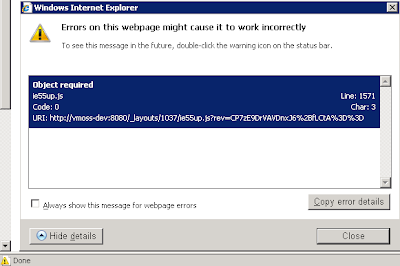
Webpage error details. Object required

Image
Not long ago, I created a new master-page (from scratch) at SharePoint Designer . I'm done to add all the controls - looks good! But when I started working with web-parts - had a little problem. D rag and Drop did not work. I received the following error: Webpage error details User Agent: Mozilla/4.0 (compatible; MSIE 8.0; Windows NT 6.1; WOW64; Trident/4.0; SLCC2; .NET CLR 2.0.50727; .NET CLR 3.5.30729; .NET CLR 3.0.30729; .NET4.0C; .NET4.0E) Timestamp: Sun, 8 Jan 2012 11:46:30 UTC Message: Object required Line: 1571 Char: 3 Code: 0 URI: http://yoururl/ie55up.js Webpage error details. Object required Google search brought me to the following blog: Neil Mosafi  - http://neilmosafi.blogspot.com/2007/11/sharepoint-dragging-webparts-causes.html When I added the code - he really helped me < script language ="javascript" type ="text/javascript"> function MSOLayout_GetRealOffset(StartingObject, OffsetType, EndParent) {  ...

Sharepoint 2007 Crawl Never Ends - Always Status Crawling

Image
I had "Not Stopped the Search Index Crawler " case in SharePoint 2007 (in “ Crawling ” status indefinitely) and doesn't respond to stop requests I had not stopped the search case " Stop Crawl " But nothing - stuck " Stopping " The solution:  Enter the following stsadm commands : execadmsvcjobs , osearch -action stop, -o osearch -action start -role Index C:\>stsadm -o  execadmsvcjobs Executing . Operation completed successfully. C:\ >stsadm -o osearch -action stop The Office SharePoint Server Search service was successfully stopped. C:\>stsadm -o osearch -action start -role Index The Office SharePoint Server Search service was successfully started. Now you need to do - Reset all craweld content Now re-run the indexing, this should solve the problem. Hope I helped, Roi

SPListItem​Collection to Linq List

Image
This time you code gives us extension to  SPListItemCollection object. SPListItem​Collection to Linq List If you want to work with the object of SPListItemCollection using linq - The following code can help public   static   List < SPListItem > ToList( this   SPListItemCollection  items) {      IEnumerable < SPListItem > itemsContiens = items.OfType< SPListItem >();      return  itemsContiens.ToList< SPListItem >(); } Yours... Roi

Update SharePoint fields on Client-Side with spservices

Image
This time I will present a client-side code (JavaScript) - which updates a list of fields without having to insert the data (edit) into the form. All you need is another class from beloved and familiar - jquery that Called- spservice :  http://spservices.codeplex.com/ It works in 2007 and 2010 because the code in the form ajax turns  to the sharepoint web-service. (Although in 2010 we have the " Client Object Model "). The following code built two objects - an image and textbox I make an update of the field after clicking on the image, and then I prevent users from updating again. Please note, I use the method of spservice SPUpdateMultipleListItems . The method get the following variables: webURL, listName, CAMLQuery, batchCmd, valuepairs, debug ...    < input   type ="text"   id ="txt <% = this.UniqueID %> "   class ="myClass1"   value =" <% = likeValue %> "   />    < img   ...

value does not fall within the expected range

Image
Did you have the following situation ? Access to the sharepoint list . Operations in any action , then try to contact list again , but this time , and receive the following message value does not fall within the expected range. What to do? You need to refrash the web and the list! Use this code: /// <summary> /// Refresh a List /// </summary> /// <param name="list"></param> /// <returns></returns> public static SPList RefreshList( SPList list) {      return RefreshWeb(list.ParentWeb).Lists[list.ID]; } /// <summary> /// Return the web /// </summary> /// <param name="web"></param> /// <returns></returns> public static SPWeb RefreshWeb( SPWeb web) {      web = new SPSite (web.Site.ID).OpenWeb(web.ID);      web.AllowUnsafeUpdates = true ;    ...

Update SharePoint Master Page with Code (C#)

This time I brought a code which allows you to update SharePoint master page on console project (with C#.Net and not with SPD). We look for a site that starts with "http://moss2007/Test-Base/", check that the masterpage had the old version , and we will update the new masterpage . For this subject, we'll have to save the masterpage on a physical file  (C:). In addition, we have to approve the masterpage. using System; using System.Collections. Generic ; using System.Text; using System.IO; using Microsoft.SharePoint; using Microsoft.SharePoint.Publishing; using Microsoft.SharePoint.Administration; namespace Roi.SharePoint.UpdateMasterPage {   class Program   {     private const string oldMasterPage = "workgroup.master" ;     private const string newMasterPage = "NewMaster.master" ;     static void Main( string [] args)     {       SPWebApplicatio...