Posts

Showing posts with the label Adminstrator

Limit access to your IIS site to specific security Active Directory groups

You can limit access to your IIS site to specific security Active Directory (AD) groups. Here are the steps to do this: Step 1 : Create or Identify the Security Group in Active Directory 1. Open Active Directory Users and Computers (ADUC)  on your domain controller. 2. Navigate to the Organizational Unit (OU)  where you want to create the group. 3. Right-click the OU, select New  > Group . 4. Name your group and ensure the Group scope  is set to Security . 5. Add users to this group who should have access to the IIS site. Step 2: Configure IIS to Use Windows Authentication 1. Open IIS Manager  on your web server. 2. Select your site from the Connections  pane. 3. Double-click Authentication in the Features View . 4. Enable   Windows Authentication  and Disable  other authentication methods like Anonymous Authentication . Step 3 : Set NTFS Permissions for the Site Folder 1. Navigate to the folder containing your IIS site's content. 2. Ri...

WSP not deployed in all SharePoint servers in the farm

Image
If you want to deploy wsp file on the SharePoint farm ... and the installation failed on some of the farm servers -  then the solution is the timejob SharePoint deploy Run this code at SharePoint PowerShell $farm  = Get-SPFarm $disabledTimers = $farm.TimerService.Instances | where {$_.Status -ne "Online"} if ($disabledTimers -ne $null) {     foreach ($timer in $disabledTimers)     {         Write-Host "Timer service instance on server " $timer.Server.Name " is not Online. Current status:" $timer.Status         Write-Host "Attempting to set the status of the service instance to online"         $timer.Status = [Microsoft.SharePoint.Administration.SPObjectStatus]::Online         $timer.Update()     } } else {     Write-Host "All Timer Service Instances in the farm are online! No problems found" } PowerShell timer job Before reinstalling recycle time Job on each ...

SharePoint Service Provisioning - the service stuck on starting

Image
When I tried to run SharePoint service - Manage Metadata Web Service on the Central Admin ... I wait and still Staring (Stuck)... So again I ran the command (From SharePoint PowerShell) Get-SPServiceInstance -Server SERVERNAME| where-object  {$_.TypeName -eq "Managed Metadata Web Service"} | Start-SPServiceInstance -confirm:$false > $null And I got the Error Start-SPServiceInstance : An object of the type Microsoft.SharePoint.Administration.SPServiceInstanceJobDefinition named "job-service-instance-ba7339e3-fb42-49c4-ac66-ab08e84eae0f" already exists under the parent Microsoft.SharePoint.Administration.SPTimerService named "SPTimerV4".  Rename your object or delete the existing object. At line:1 char:111 + ... eb Service"} | Start-SPServiceInstance -confirm:$false > $null +                    ~~~~~~~~~~~~~~~~~~~~~~~~~~~~~~~~~~~~~~~~~~~~~~~  ...

Converting SharePoint site from Version 2013 to 2016

Image
In this time Microsoft did a good job with Migration SharePoint 2013 to SharePoint 2016, and within a few hours it is possible to upgrade the site from 2013 to 2016 Even the code in Visual Studio was easy to upgrade  fron VS 2013 to VS 2015 update 3 with Office package I did this steps  Save wsp website (version 2013) Copy (backup restore) the DataBase from SQL 2012 DB 2016, and to ensure that it has sp admin privileges DB_Owner to the new DB In Central Adminstration -> Manage web applications a. Creating a Web Application with DB temporary b. Create a Site Collection c. Setting up the site in the hosts found in the C:\Windows\System32\drivers\etc\ with a local IP  Add the wsp site (Old from 2013) a. In powerShell -> Add-SPSolution -LiteralPath PATH b. Installing the solotion site (or in powerShell -> Install-SPSolution or in Central Adminstration -> System Settings -> Manage farm solutions) Remove the temporary DB site (in Central Adminstrati...

The URL is invalid. It may refer to a nonexistent file or folder, or refer to a valid file or folder that is not in the current Web at SharePoint

Image
I recently had the following error when I tried to add a document to a document library. The URL <file name>  is invalid. It may refer to a nonexistent file or folder, or refer to a valid file or folder that is not in the current Web.  A quick search on google said that brought the resources of SQL Server. I checked and indeed I increased the resources but to no avail. Even my examination chrome and Internet Explorer. I checked Word file, PDF, and even a small text file. A.  Nothing helped. I opened a new document library, and in fact it could add document :)  Ok ... what is the problem ???  It should be noted in the document library came from List Definition and Content Type preset. I started to check each field and field Then I got a Date Field in the file probably was not his elemet.xml incubated right.  When I set it to Today date .... it worked  All it needed was simply to write the true definition of the field  ...

How to open a PDF file (or any file) in the sharepoint site

Image
Not long ago, I had to view a PDF file from sharepoint . But I got the following message: Do you want to save file-name from yours-site Who does not know this message? But I've  target ' self ' in 'a' tag html???? It turns out that SharePoint having your code to protect customers. They can only give you their familiar software like Office, but a pdf file - Microsoft unfamiliar terms. To resolve, you need to make a change in Central-Admin Go to your Web Application manage - General Setting Find Browser File Handling and Change the default to Strict . It all friends, now you can view any file on the portal (at your own risk). Your, Roi

Service Pack 2‏ (SP2) for Microsoft SharePoint 2010 and Office 2010

Last month came new version (Service Pack 2) for Office 2010, SharePoint 2010,  Project server 2010 and the Fast 2010. Here are some links that will help you Service Pack 2 for Microsoft Office 2010 (KB2687455) 32-Bit Edition http://www.microsoft.com/en-us/download/details.aspx?id=39667 Service Pack 2 for Microsoft Office 2010 (KB2687455) 64-Bit Edition http://www.microsoft.com/en-us/download/details.aspx?id=39647 Note: In addition to the products in the Office 2010 suite, service pack 2687455 also updates Microsoft Project 2010, Microsoft Visio 2010, and Microsoft SharePoint Designer 2010 Service Pack 2‏ (SP2) for Microsoft SharePoint Server 2010 (KB2687453) http://www.microsoft.com/he-il/download/details.aspx?id=39672 Service Pack 2‏ (SP2) for Microsoft SharePoint Foundation 2010 Language Pack (KB2687466) http://www.microsoft.com/he-il/download/details.aspx?id=39674 Service Pack 2‏ (SP2) for Microsoft FAST Search Server 2010 for SharePoint (KB2687446) http://...

Speedup Powershell at SharePoint 2013

Image
If you worked in stsadm in MOSS 2007 and even if it worked in SharePoint 2010 , you saw it slow. In 2010 we also added the powershell - who was sometimes slow. It turns out that in sharepoint 2013 not made significant changes - is suggested The solutions are Add crl.microsoft.com to your hosts file and point it to your local machine Go to Start -> Run Click "Drivers" (It need to open " C:\Windows\System32\drivers " - in not go to it) Go to folder " etc " and open " hosts " file with notepad and add this line 127.0.0.1       crl.microsoft.com Disclosure: this solution find a lot on Google - but my no significant change Disable the CRL check by modifying the registry for all user accounts that use STSADM and all service accounts used by SharePoint. Go to Start -> regedit and fund this location [HKEY_USERS\<userid>\Software\Microsoft\Windows\CurrentVersion\WinTrust\Trust Providers\Software Publishing] Yon need to change all y...

How to set as Secure Store Service in SharePoint 2010

Image
This time I'll introduce how to install   SSS (Secure Store Service) in SharePoint 2010 in 9 Easy Steps (tutorial) 1. Go to Central Admin -> Application Management On Service Applications link   Manage services on server 2. Start  Secure Store Service 3. Now, Click Applications Management then Manage Service Applications 4. Click New and then  Secure Store Service 5. Write Your Data 6. Click OK and you get this screen 7. On  Manage Service Applications you can see your service 8. Now you can create a new key - click Generate New Key 9. Write your key It all my friends, Roi

Update and synchronize user names in SharePoint

Image
Often - people change their names in the organization - getting married, getting divorced, or just decide to change their name because ... For some reason, SharePoint can not synchronize the new names. Here's a command  for a version of SharePoint 2007 and up that will help you stsadm -o migrateuser -oldlogin Domain\OldUserName -newlogin Domain\NewUsername -ignoresidhistory For a version of SP 2010 and up , With PowerShell Move-SPUser –Identity " Domain \ OldUserName " –NewAlias "Domain\ NewUsername " Enjoy, Roi

Enable-SPFeature: The Feature is not a Farm Level Feature and is not found in a Site level defined by the Url

Image
After running the following command Enable-SPFeature-Identity DocumentSet-URL http://url I received the following error Enable-SPFeature: The Feature is not a Farm Level Feature and is not found in a Site level defined by the Url ... Why ??? It happened to me because I copied some files at the time manually (not using the solution). The team system locks the files to ReadOnly . And the command fails (the readonly found only a deep excavation in the log files of sharepoint) The solution: D isables the ReadOnly for all the files in sub folders. It can be found here: Uncheck read only file for all sub folder with PowerShell I use this code at 14\Template folder Thanks, Roi

SharePoint 2010: Set session timeout on an FBA enabled site

One of the problems SharePoint 2010 when trying to work on Forms Based Authentication (FBA), all the settings in IIS (and web.config) enable sessions of not working. After researching on google, I realized it was a problem in SP 2010. There are many blogs that give code that fixes the problem by correcting the global.asax . I checked and indeed it works, but it does not seem the ultimate solution. Best solution is (for me) working on SharePoint 2010 SP1 . A code of PowerShell . Code: $sts = Get-SPSecurityTokenServiceConfig $sts.LogonTokenCacheExpirationWindow = (New-TimeSpan –minutes 20) $sts.WindowsTokenLifetime = (New-TimeSpan –minutes 20) $sts.FormsTokenLifetime = (New-TimeSpan -minutes 20) $sts.Update() Iisreset You can change the 20 minutes, of course. Hope I helped, Roi

Custom Timer Jobs: func FeatureActivated Access denied

Things worked in the past - do not work more And today issue timer job At MOSS 2007 on the timer job worked, and Today at SharePoint 2010 the timer job runs on owstimer.exe and get an error that the timer job does not work The Error Message: The description for Event ID 0 from source Application can not be found. Either the component that raises this event is not installed on your local computer or the installation is corrupted. You can install or repair the component on the local computer. If the event originated on another computer, the display information had to be saved with the event. The following information was included with the event: Custom Timer Jobs: func FeatureActivated Access denied . The solution - PowerShell Run this code: $contentService = [Microsoft.SharePoint.Administration.SPWebService]::ContentService # turn off remote administration security $contentService.RemoteAdministratorAccessDenied = $false # update the web service $contentS...

Export SharePoint 2010 sites list to Excel File

Image
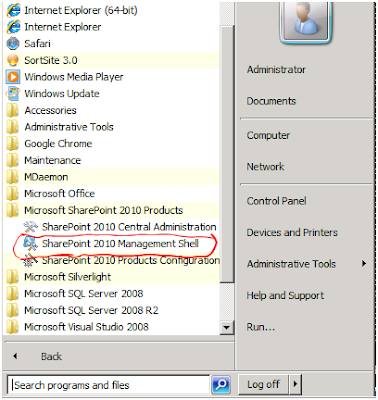
How to get the SharePoint 2010 sites list to Excel using  Powershell ? Go to  SharePoint 2010 Management Shell . You have to open the Web Application, then the Site Collection, after Select the Fields and Export to Excel (csv file) $Get-SPSite | Get-SPWeb | Select url,title | Export-Csv All this on one line in PowerShell, just think how much time it saves time instead of building a console application. Yours Roi

The underlying connection was closed: An unexpected error occurred on a receive

Image
When I tried to access an external server on the server side (not the organization) through the code (in my case web-part of sharepoint) I got an error: The code is simple code: public   XmlDocument  GetXmlData() {      XmlDocument  document =  new   XmlDocument ();      //Now load the XML Document     document.Load( this .url); // fall      return  document; } The error I got it:    The underlying connection was closed: An unexpected error occurred on a receive.    Unable to read data from the transport connection: An existing connection was forcibly closed by the remote host.    at System.Net.HttpWebRequest.GetResponse()    at System.Xml.XmlDownloadManager.GetNonFileStream(Uri uri, ICredentials credentials)    at System.Xml.XmlDownloadManager.GetStream(Uri uri, ICredentials crede...

Server is too busy

Image
This time I came across a seemingly simple problem I received the following message at the portal Server is too busy CPU processor of Windows SharePoint Server yield was 100% !!! CPU 100% Thanks to RRaveen - How to resolve the “Server Too Busy” error in asp.net , I understand what the problem. Previously explained how to solve a problem of " large data transfer in web service " I showed how to change executionTimeout on the web.config To correct the error - You need to change the variable " executionTimeout " to 3600 (this an hour because it a number of seconds - 60 * 60 = 3600) Go to the web.config and set the tag httpRuntime the following code on the " system.web " tag. < system.web >   < httpRuntime executionTimeout = " 3600 " maxRequestLength = " 51200 " > ... This should solve the problem. If not, Should reduce the number (the default is 110 seconds). thanks, Roi

Daily alerts do not work at SharePoint

Did you encounter a problem alerts list ? Something strange happened to me ( hurray sharepoint ...). A lerts were working fine - just a list daily alerts stopped working . I really do not know why this list . After searching on google - I realized that take care stsadm commands such problems . All you have to do is make those commands in the order ( and of course replace the http://YOURSITE to your site ) . stsadm -o updatealerttemplates -url http://YOURSITE -f "c:\Program Files\Common Files\Microsoft Shared\web server extensions\12\TEMPLATE\XML\alerttemplates.xml" -LCID 1037 stsadm.exe -o setproperty -url http://YOURSITE -pn alerts-enabled -pv true stsadm.exe -o setproperty -url http://YOURSITE -pn job-immediate-alerts -pv "every 5 minutes" I would like to thank Noam - helped me find the solution and fix the problem. Your, Roi

Error occurred in deployment step 'Recycle IIS Application Pool': The local SharePoint server is not available. Check that the server is running and connected to the SharePoint farm

Image
Did you receive the following error when you tried to compile a project of SharePoint 2010? Error occurred in deployment step 'Recycle IIS Application Pool': The local SharePoint server is not available. Check that the server is running and connected to the SharePoint farm. So - the solution is simple You should be Full Permission on the SharePoint Farm - including a data base (DB owner). After it is completed - open the visual studio as administrator. Cheers, Roi Kolbinger

Failed to extract the cab file in the solution / Root element is missing

Image
Did you encounter the following error message? Failed to extract the cab file in the solution. I came across this message - in my case it was install a solution . Another problem I had with the solution Root element is missing. After thorough testing - I found the solution The Size of File wss.xsd was 0k Is the stsadm command uses this file ????.... Yes! All you need do is to copy from server that work correctly the file wss.xsd. Those who do not know the file is sitting in 12Hive \TEMPLATE\XML for MOSS 2007 14Hive \TEMPLATE\XML for SharePoint 2010 The file is responsible for all schema of the SharePoint . Hope I helped, Roi Kolbinger

Problem with stsadm addwppack command

Image
Recently I came across an unfamiliar problem, when I tried to install web-part (stsadm addwppack command). I ran the following simple command: D:\>stsadm -o addwppack -force -globalinstall -url http://mySite -filename WP_Debloy.CAB And the message I received: This solution contains no resources scoped for a Web application and cannot be deployed to a particular Web application. What the hell's going on? After games of all kinds of trials, I got a solution: instead of running the command -url , I ran the command -nodeploy . And I got the following message: "wp_debloy.cab" has an unsupported extension, and cannot be added to the solution store. So it's easy - Suddenly, the CMD is important for me to write in small letters (insteand of -filename WP_Debloy. CAB - You need to write -filename WP_Debloy. cab ). Yes... I got Operation completed successfully. Now I ran the command again with the -url command and everything went correctly. Yours, Roi